What to Wear Today — Choosing a Weather Outfit App by Type (2026)
A guide for people who want one app to end the closet stare, instead of losing minutes every morning. We organize by type of app — not by individual app name — because store listings change too fast to pin down.
If you spend a few minutes picking an outfit every weekday morning, that stacks up to a meaningful amount of time each month. An app that shows you a recommendation tuned to the weather and your sensitivity in about a second structurally shrinks that time. Instead of comparing individual apps — whose store info shifts week to week — this guide (as of April 2026) organizes by how the app works, so you understand the pros and cons of each type first, then verify current details in the store.
Get today's recommendation from WearCast →
5 criteria to check when choosing an app
Every app claims "weather + outfit recommendation," but these five factors are what actually make a difference day to day.
- Specificity of the recommendation — abstract phrasing like "light clothing" vs. actual item-level suggestions
- Personalization depth — same recommendation for everyone vs. adjusted for your sensitivity
- Language support — does it feel natural to use in your native language
- Data source — whether it pulls from a real weather API (Open-Meteo, KMA OpenAPI, OpenWeather, etc.)
- Pricing model — free vs. subscription vs. one-time purchase vs. ad-supported
Type 1: Weather-extension apps — "Dress lightly today"
A regular weather app with a short outfit blurb attached. It's usually tied to official weather data and gives accurate conditions, but the outfit advice is a single abstract sentence.
Pros
- Many are free/ad-supported with zero barrier to entry
- Weather information itself is accurate (official API-backed)
- Strong native-language support in most markets
Cons
- Recommendations stay at the "wear a light jacket" level, so you still have to judge the details yourself in the morning
- No personal sensitivity handling — assumes an average body
- Some only show air temperature, skipping wind- and humidity-adjusted feels-like
Good fit for: people who just want a weather check with a hint of outfit guidance and are comfortable treating it as a rough reference rather than a full recommendation.
Type 2: Sensitivity-based apps — "You run cold"
These apps ask about your temperature sensitivity (cold / heat) and adjust the standard per-temperature recommendation to give you a personalized outfit.
Pros
- Systemically addresses the problem of cold-sensitive people underdressing
- Usually recommends based on feels-like temperature (wind + humidity included)
- Frequently gives item-level suggestions, which are easier to act on
Cons
- Many apps only offer a single toggle for "warm/cool" sensitivity — if you run cold in winter but average in summer, the toggle breaks down
- Translation quality varies by app; non-English apps often have partial or English-only support in other languages
- Paid subscription models are common
Good fit for: people who keep feeling that "the average recommendation just doesn't match me." Apps that treat cold and heat sensitivity as independent axes will be more accurate.
Type 3: Wardrobe-based apps — "Pick from your own closet"
You register your wardrobe by photo, and the app recommends combinations from within that closet based on today's weather.
Pros
- The most concrete recommendation — grounded in clothes you already own
- No push to shop, just better use of what you have
- Combinations can spark new outfit ideas
Cons
- Wardrobe registration takes a lot of upfront time (photos + category tagging)
- Every new purchase and laundry cycle means updates
- Most use a paid subscription model
- Weak non-English localization in many apps
Good fit for: people whose wardrobes are reasonably organized and who can invest the setup time. Also great if you want more outfit variety.
Common mistakes when using these apps
- Trusting the first recommendation as-is — no app's initial profile is accurate. Use it for 3–5 days, then recalibrate your sensitivity settings
- Turning off notifications — the morning push is the core value of these apps. Set the offset time right and your re-check time drops to near zero
- Denying location access — manual region setup fails on travel and commute days
- Sticking with one app too long — if a month in it still doesn't fit, switch types rather than switching apps. Apps within the same type share the same limits
Quick guide by situation
I run cold, so recommendations always feel too thin
A sensitivity-based app is essential. Specifically pick one that treats cold and heat sensitivity as two independent axes. Apps with only a single toggle often get winter right but go weird in summer. Details in the guide for people who run cold.
I want a free app in my own language
Start with a weather-extension app. Free, official-data-backed local apps are easy to find in most markets. Accuracy is limited without sensitivity calibration, but the barrier to entry is zero.
I travel or live across multiple countries
Pick a sensitivity-based app with broad localization. Only a few support more than 9 languages, which narrows your list fast. Check the "supported languages" field in the store carefully.
I want recommendations from my own closet
A wardrobe-based app is the longest-standing answer here. The trade-off is the setup time and usually a paid subscription. If that's too much, start with a general per-temperature-range app and pair it with the rules-of-thumb table in the transitional-season outfit guide.
How we handle this
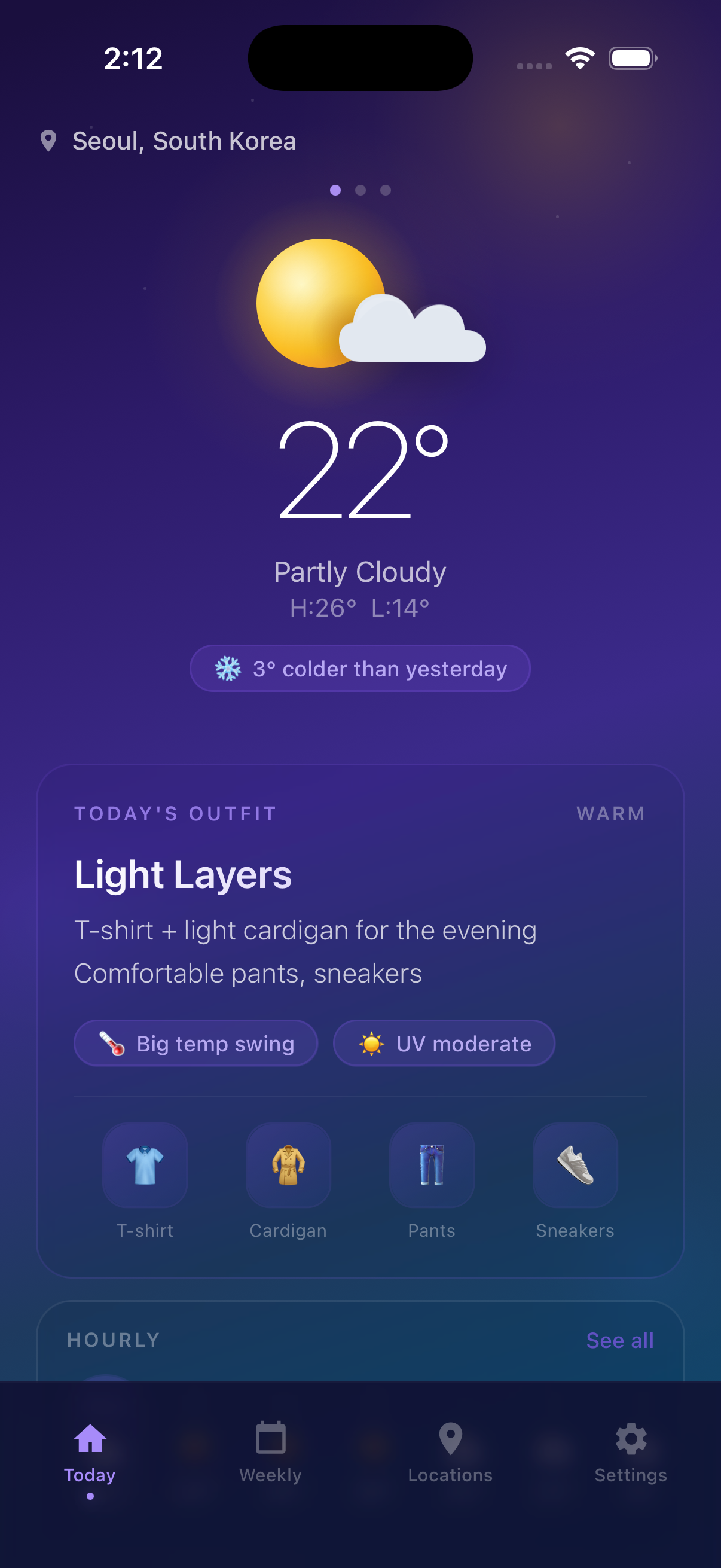
WearCast was designed by working backwards from the shared weaknesses of the three types above. No wardrobe setup required, and cold and heat sensitivity are captured as two independent axes to get past the single-toggle limitation. Feels-like temperature uses Open-Meteo data with wind and humidity factored in. Tap once on one of six activity modes — commute, running, walking, hiking, cycling, school — and the home screen shows a single "wear this today" recommendation. Banner ads only, no interstitials.
FAQ
Q. Is a paid outfit app worth it? A. If picking an outfit takes a few minutes each weekday morning, that adds up to a meaningful amount of time per month. Cutting that in half can offset a subscription. But if you don't use the app daily, a one-time purchase or an ad-removal IAP may be a better fit.
Q. Can an outfit app really match my body? A. 100% accuracy isn't realistic. What the app actually does is automate "adjusting from an average recommendation to you personally." Cold-sensitive people who apply the average directly always underdress. Apps with sensitivity features systemically reduce that error, and as your own feedback builds up (3–5 days), accuracy keeps climbing.
Q. Do free apps always have a lot of ads? A. It depends on the app. Banner-only apps don't disrupt usage, but apps heavy on interstitials can ruin those 3 seconds in the morning. When you're picking an app, search reviews for "interstitial" — users tend to leave plenty of first-hand reports. WearCast deliberately uses banner ads only, no interstitials.
Q. What's the difference between KMA (Korea Meteorological Administration) data and a global weather API like Open-Meteo? A. For a single, precise domestic region, the KMA OpenAPI is denser. For mixing overseas and domestic in one app, a global API like Open-Meteo is easier. At the level of practical outfit recommendations, feels-like temperature, wind, humidity, and precipitation are the drivers — both datasets work fine.
Related reading
- Complete transitional-season outfit guide — per-range recommendations + sensitivity adjustment table — judging by rules of thumb, no app required
- Weather outfit guide for people who run cold — why sensitivity handling matters
- Hiking clothing by temperature — layering through spring, fall, and winter — when activity mode matters