What to Wear Weather Apps in 2026 — Compared by a Daily User
The phrase "what to wear weather app" returns dozens of results, and most of them recommend the same outfit to everybody. The categories below explain why.
A working weather outfit app needs to answer one specific question: what should this person wear today. That is not the same as showing the temperature, humidity, and a generic "light jacket" icon. The difference between a forecast widget and an outfit advisor is whether the recommendation knows your body and your day. After running side-by-side comparisons across the categories of weather outfit tools that exist today, the picture is clearer than the App Store search results suggest. There is no single best app — there are four meaningfully different categories, and the right one depends on how cold-sensitive you are, how much you travel, and how much patience you have for setup.
Skip the comparison and try the dual-sensitivity approach in WearCast →
The four categories of weather outfit apps
Most apps that show up under "what to wear" search results fall into one of four categories. Knowing which category an app belongs to predicts almost everything about whether it will work for you.
Category 1: Generic weather apps with an outfit icon
These are the big-name forecast apps that added a clothing icon next to the temperature. The recommendation is essentially a temperature lookup table — 40°F shows a coat, 70°F shows a t-shirt, and that is the entire personalization. They are accurate as a forecast, but the outfit advice is identical for everyone in the same city.
Best for: people who already trust their own outfit judgment and only need a temperature reminder.
Not great for: anyone who runs colder or warmer than average, anyone whose comfort range differs from the median.
Category 2: Outfit recommender apps with a single comfort dial
These apps ask one onboarding question — "do you run hot or cold?" — and apply a single offset to the temperature before recommending an outfit. They are a meaningful improvement over Category 1, but they assume that a person who runs cold in winter also runs cold in summer. In practice, many people are very cold-sensitive at 40°F and perfectly average at 80°F. A single dial cannot represent that.
Best for: people with consistent year-round sensitivity in one direction.
Not great for: people whose cold sensitivity and heat sensitivity are different. The dual-axis approach is what our cold-sensitive outfit recommendations guide uses, and it matches how human thermoregulation actually works.
Category 3: Smart wardrobe apps
These apps ask you to photograph your clothes, tag them with categories, and then build outfits from your wardrobe. They have a learning curve measured in hours, not minutes, and the suggestion quality depends on how diligently you maintain the wardrobe data.
Best for: people who already enjoy outfit planning as a hobby and want a digital catalog of their wardrobe.
Not great for: anyone looking for "tell me what to wear in 15 seconds." The setup time alone disqualifies these apps for most daily-use cases.
Category 4: Activity-aware weather outfit apps
This is the newest category. Apps in this group ask both about your sensitivity and about your activity for the day — commuting, running, hiking, cycling, or school — and adjust the outfit accordingly. A 50°F day for a commuter and a 50°F day for a runner are not the same outfit problem, and Category 4 apps are the first ones to acknowledge that.
Best for: people whose days vary by activity and who want one-tap recommendations.
Not great for: people who only want a forecast and find any onboarding question excessive.
Comparison table — what each category actually does
| Feature | Generic forecast | Single-dial recommender | Smart wardrobe | Activity-aware |
|---|---|---|---|---|
| Setup time | None | 30 seconds | 1-3 hours | 30-60 seconds |
| Accounts for cold sensitivity | No | Yes (1 axis) | No | Yes (2 axes) |
| Accounts for heat sensitivity | No | Same axis as cold | No | Yes (separate axis) |
| Activity-aware | No | No | Sometimes | Yes |
| Wind / humidity weighting | Forecast only | Sometimes | No | Yes |
| Wardrobe upload | No | No | Required | Optional |
| Daily-use friction | Very low | Very low | High | Low |
| Multi-language support | Varies | Often English only | Often English only | Varies |
Where most apps quietly fall short
Two patterns repeat across the categories.
The single-axis sensitivity assumption. Treating cold and heat sensitivity as opposite ends of one dial is the single biggest design flaw in this entire category. Plenty of people are cold-sensitive in winter and average in summer, or the other way around. A dial that forces you to pick one is wrong half the year. This is the gap that drove WearCast to use two independent sensitivity sliders.
Temperature-only recommendations. A 50°F day with 5 mph wind feels different from a 50°F day with 25 mph wind. A 65°F day at 80% humidity feels different from the same temperature at 30% humidity. Most weather outfit apps still recommend an outfit based on the dry-bulb temperature alone, even though the data needed to factor in wind and humidity is in the same forecast feed they already pull.
If an app you are evaluating ignores either of these, it is not personalized in any meaningful sense — it is a thermometer with a clothing icon attached.
How to evaluate a weather outfit app for yourself
Three quick tests work for almost any app in this category.
Test 1: The cold-sensitive person test. During onboarding, does it ask separately about your cold sensitivity and your heat sensitivity? If the answer is "no" or "one combined dial," the app cannot represent body types where the two are independent.
Test 2: The activity test. Try setting today as "running outdoors" and again as "office commute." Does the recommendation change for the same temperature? If not, the app is treating every day the same.
Test 3: The breeze test. Pick a day with similar temperature to yesterday but noticeably different wind. Does the recommendation reflect the wind difference? If yes, the app is likely accounting for wind — either through feels-like temperature, an apparent-temperature model, or a separate wind adjustment. If not, it is using only the thermometer.
Apps that pass all three are doing real work. Apps that fail more than one are decorative.
How WearCast approaches the same problem
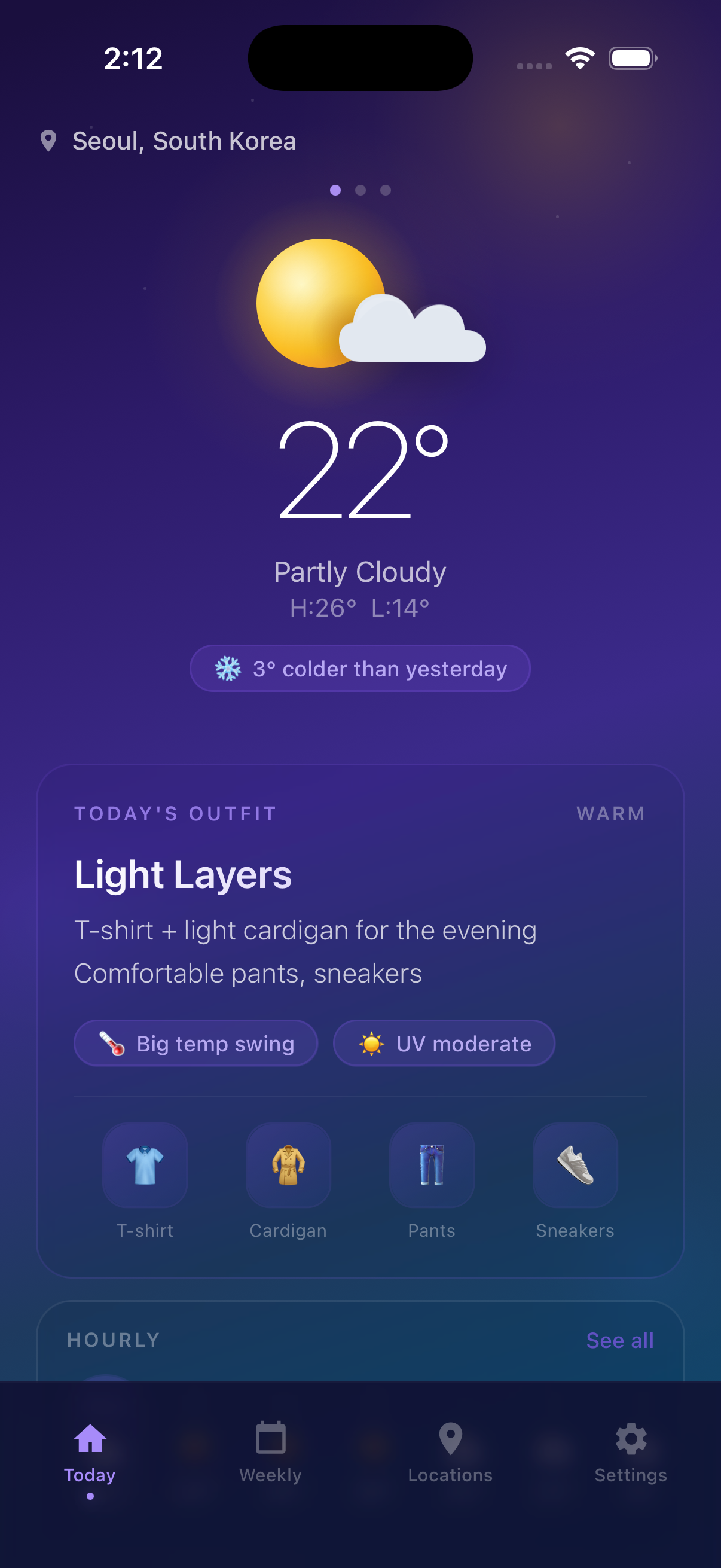
WearCast was designed around the failures listed above. It asks for cold sensitivity and heat sensitivity as two separate sliders during a 30-second onboarding. From there, it pulls live feels-like temperature from Open-Meteo (including wind and humidity), applies your personal profile, and adds an activity tag — commute, running, walking, hiking, cycling, or school — that you set with one tap. There is no wardrobe upload, no three-option menu, and no "is it cold today?" question after the first day. The output is a single outfit card per day that adjusts to your body and your plan.
The app supports 17 languages, including English, Korean, Japanese, Chinese (Simplified and Traditional), German, French, Spanish, and Brazilian Portuguese, which makes it usable when you travel between climates.
FAQ
Q. Is there one weather outfit app that works for everyone? A. No, and any review that claims otherwise is selling you something. The right app depends on whether your cold and heat sensitivities are aligned or independent, whether your day-to-day activity varies, and how much setup time you are willing to invest. The four-category framework above is more useful than a ranked list because it helps you predict which category your needs put you in. From there, picking a specific app is straightforward.
Q. Why do so many apps still use a single sensitivity dial? A. Because it is simpler to design and onboard. Two sliders look more complicated, and product teams often optimize for "fewest taps in onboarding" without checking whether the simpler model produces accurate output. The trade-off is that you save five seconds during setup and lose accuracy for the next several years of daily use.
Q. Do I need a smart-wardrobe app to get good outfit recommendations? A. No. Smart wardrobe apps are useful if you enjoy maintaining a clothing catalog, but for the daily question of "what should I wear in 15 seconds," they introduce more friction than they remove. An activity-aware app with a dual-sensitivity model gives most of the benefit at a fraction of the setup cost.
Q. How do I know if I am cold-sensitive enough to need a specialized app? A. The simplest signal is whether you regularly disagree with the recommendation in a generic forecast app. If "light jacket weather" leaves you shivering or "wear a coat" makes you overheat, your sensitivity is meaningfully different from the median, and a single-axis app will continue to be wrong for you. The detailed framework is in our cold-sensitive outfit recommendations guide.
Q. Do these apps work for travel between very different climates? A. The activity-aware category usually does. Wind and humidity differences between coastal Seattle and dry Phoenix change what a 60°F day feels like, and any app that uses feels-like temperature will adapt. The dual-sensitivity model also helps because your cold sensitivity at 60°F and heat sensitivity at 90°F are doing different work on the same trip.
Related guides
- How to Dress for 50 Degree Weather — the layering formula for the most-misread temperature
- How to Layer Clothes for Cold Weather — the multi-layer mechanics
- Outfit Recommendations for Cold-Sensitive People — a year-round framework